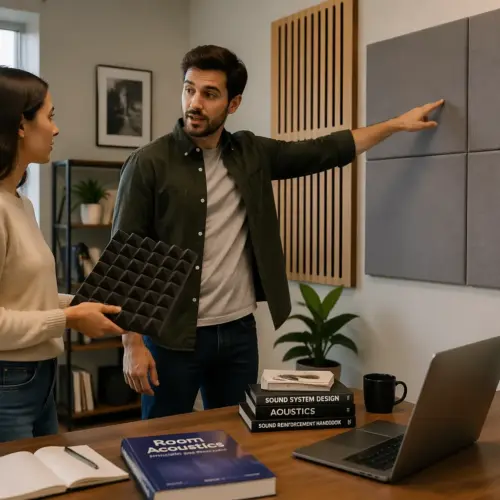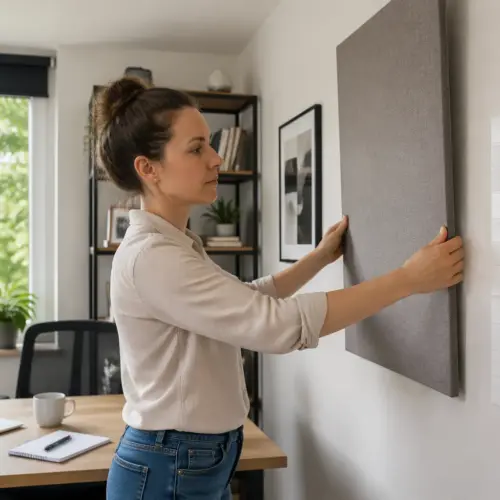


If your home office desk is where you mix audio, take Zoom calls, and listen to music, the acoustics have to do too many jobs at once. The good news is that a smart acoustic panels behind desk setup can make all of those jobs easier without turning your room into a foam cave.
The bad news is that most people treat the wrong wall first, then wonder why their voice still sounds boxy and their speakers still feel smeared. A desk creates predictable reflection paths, and you can fix a lot of them with a handful of panels in the right places.
This article focuses on two zones, the wall behind monitors and the wall behind you, plus side walls and the desk itself. If you care about speaker reflection control and video call audio clarity, placement matters more than buying thicker panels “just in case.”
The acoustic problems a desk setup creates
A desk is a hard, flat reflector sitting inches from your mouth and your speakers. That surface sends sound right back into your mic and your ears, which is why you hear a papery slap or a hollow “office” tone.
That reflection is extra annoying because it is so fast that your brain blends it with the direct sound. Instead of hearing a separate echo, you just hear less definition and a strange glare in the upper mids.
Your monitors and laptop screen also act like little acoustic mirrors. They bounce mid and high frequencies into the same area where you are trying to judge clarity, which makes EQ and sibilance decisions feel weirdly inconsistent.
Even a matte display can reflect sound, because the issue is the shape and hardness, not the shine. If your mic is pointed anywhere near the screens, those reflections can sneak into calls as a subtle zing.
The wall behind monitors is usually the first big boundary the speakers hit after the direct sound. If it is bare drywall, you get early reflections that blur imaging and push certain frequencies forward in an annoying way.

When that front wall reflection is strong, you can turn the speakers down and still feel like the room is loud. It is not just volume, it is the extra energy arriving from the wrong direction.
The wall behind you is the other half of the problem, especially for calls. Your voice leaves your mouth, hits that rear wall, and comes back into the mic a split second later, which hurts video call audio clarity even when the mic is decent.
That rear reflection also changes how you perceive your own voice in the room, so you subconsciously adjust your delivery. People end up speaking louder, leaning forward, or over-compressing their mic because the room feels uncontrolled.
Low frequencies are the slow-moving troublemakers in desk rooms because they pile up in corners and along walls. You may not hear them as “echo,” but you feel them as a boomy note that makes every voice sound thicker than it should.
Small rooms also create standing waves that make the bass change dramatically when you move your head a few inches. That is why one spot at the desk sounds fine and the next spot sounds like a subwoofer got turned on.
Finally, the desk setup itself encourages close boundaries, like speakers shoved against a wall or a chair backed into a corner. Those choices are convenient for furniture, but they are exactly what makes reflections and bass buildup more intense.
Treating the wall behind your monitors
The wall behind monitors is where many “my speakers sound harsh” complaints start. Early reflections from that surface arrive fast enough to combine with the direct sound, so you hear comb filtering instead of clean detail.
Comb filtering is why a vocal can sound clear on one song and spitty on the next even at the same level. The reflection creates little peaks and dips that move around depending on the exact frequency content.
Start by centering panels on the space between and slightly outside the speakers, not on the centerline of the desk only. If your speakers are 3 to 5 feet from the wall, you still treat it, because the reflection is strong and timed right in the messy zone.
If the speakers are very close to the wall, the reflection gets even stronger and the boundary effect boosts bass. In that case, panels help with mids and highs, but you also want to pull the speakers forward if you can spare the inches.
Think of the front wall as part of the speaker, because it changes what reaches your ears. When you treat it, the speakers stop sounding like they are glued to the wall and start sounding like they are floating in space.
Height matters because tweeters are usually around ear level, and that is where the most critical reflection happens. If you mount panels too low because it looks tidy behind the desk, you can miss the reflection path that matters most.
Thickness matters here, but placement matters more. Two inch panels tame upper mids and highs, while four inch panels reach lower and calm that chesty buildup you hear when you lean in toward the screen.
If you can leave an air gap behind a panel, you effectively increase its low frequency performance without buying a thicker panel. Even a 2 inch panel with a 2 inch gap often behaves more like something beefier in the upper bass.
Panel density also matters because fluffy panels can look thick but not absorb much in the right range. If you are DIYing, pick materials that are actually designed for broadband absorption instead of random packing foam.
If you can only buy a few panels, put them behind the speakers first and leave the decorative stuff for later. This part of an acoustic panels behind desk setup tends to improve speaker reflection control immediately, even at low listening levels.
It is also the easiest place to hear a difference because the change affects everything you play through the speakers. You will notice tighter center image, less edge on cymbals, and fewer “why does this sound different today” moments.
If you use a single large ultrawide display, do not assume it blocks sound in a helpful way. The screen can actually create its own reflections, so treating the wall behind it still matters.
If you use dual monitors, the gap between them can act like a little funnel that throws reflections right back at you. A panel centered behind that zone often cleans up the sense of focus more than people expect.
For people who listen very close, like 2 to 3 feet from nearfields, the front wall reflection is still a problem because it is not about distance alone. It is about the reflection being early enough to interfere with the direct sound, which happens in close setups too.
If the front wall is a closet door or a thin partition, it can rattle or resonate, which is a different kind of smear. A panel can reduce the energy hitting it, and simple door seals can stop the buzzing that makes you chase phantom problems in mixes.
Treating the wall behind you (for cleaner voice on calls)
For meetings, the wall behind you is usually more important than the wall behind monitors. Your mic hears your voice plus the room, and the rear wall reflection is often the loudest “room” component.
This is especially true with laptop mics and webcam mics because they are far away and run higher gain. The more gain you need, the more the room becomes part of your voice whether you want it or not.
Even with a good dynamic mic, the rear wall can still show up because reflections do not care about brand names. If you are close to the mic, you reduce the room, but you do not eliminate it if the space is hard and small.
Put absorption at head height behind your chair, and make it wider than your shoulders. If you move around while you talk, treat a wider area so the tone does not change when you shift in the seat.
People often mount one narrow panel and then wonder why the room still sounds like a room. If your head can move outside the treated area, the reflection path changes and the mic hears that change immediately.
Distance matters because a rear wall that is 2 feet behind you is basically a slapback machine. If you can pull the chair forward even 6 to 12 inches, you reduce the strength and timing of that reflection before you even add panels.
If the rear wall is also where you keep a filing cabinet or a hard bookshelf backing, you can accidentally create extra reflective surfaces at weird angles. A panel placed to cover the most direct line behind your head is usually the highest-value move.
When you treat behind you, your voice tends to sound less “phasey” and more like it is coming from a single point. That is what people describe as sounding more professional, even if they cannot explain why.
It also helps the other people on the call because echo cancellation has less work to do. When the room is calmer, the call software does not have to clamp down as aggressively, so your voice stays more natural.
If you are using a noise suppressor or a gate, rear wall treatment makes those tools behave better. You get fewer chopped syllables and less pumping because the room decay is shorter and smoother.
| Rear wall situation | What you hear on calls | Panel fix |
|---|---|---|
| Bare drywall 2 to 4 ft behind chair | Boxy voice, “small room” ring | Two 2×4 ft panels at head height |
| Window or glass behind chair | Sharp reflections, extra sibilance | One 2×4 ft panel plus thick curtain |
| Bookshelf behind chair | Less slap, still uneven mids | One 2×4 ft panel over the most reflective section |
| Open space behind chair (long room) | Less early echo, more low boom | Panel behind chair plus corner bass trapping if possible |
If you have a door behind you, treat it like a wall because acoustically it basically is one. Doors often reflect more than drywall because they are stiff and flat, and they can add rattles if the latch is loose.
If you cannot mount panels, a freestanding gobo or even a thick moving blanket on a stand can still help. The goal is not perfection, it is reducing that one dominant reflection that makes your voice sound like it is in a tiled box.
Corner placement behind you can be surprisingly effective if your chair sits near a corner. A panel straddling the corner gives you a bit of broadband bass control while still doing the main job of killing the rear wall slap.
If you wear headphones on calls, you might underestimate how much room is in your mic because you are not hearing your own voice in the speakers. A quick recording check will usually reveal that the rear wall is still the main culprit.
If you use speakers during calls, rear wall treatment can also reduce how much your speakers feed back into the mic. Less room energy means the mic hears more of you and less of the call audio bouncing around.
Side wall panels for stereo imaging and speech
Side wall reflections mess with stereo imaging because they arrive close to the direct sound from each speaker. When those reflections are strong, the phantom center wanders, and panning decisions feel less trustworthy.
That wandering center is not subtle when you are doing voice editing or balancing instruments, because you keep second-guessing where things sit. A treated side wall often makes the center lock in so you stop chasing it with tiny pan moves.
The easiest way to find the first reflection points is the mirror trick, where a friend slides a mirror along the side wall until you can see a speaker from your seat. Wherever you see the speaker in the mirror is where a panel does the most work.
If you do not have a helper, you can tape a small mirror to a chair and slide it yourself, but it is more annoying. The key is that your head stays in the normal listening spot, because moving your head changes the geometry.
In many home offices, one side wall is close and the other side is open to a hallway or a larger space. That asymmetry makes one speaker sound brighter or louder, and it can make mixes lean to one side without you realizing it.
If you can only treat one side, treat the hard, close side first, because it produces the strongest early reflection. The open side usually contributes less early energy, even if it adds some low frequency weirdness later.
For speech, side walls matter too because your voice radiates outward and hits them at a short distance. If you clap and hear a quick “tick” instead of a short decay, that is the side wall bounce showing up.
That tick is often what makes consonants sound spitty or edgy on calls, especially when the mic is off to the side. You might think it is the mic, but it is the room throwing high frequencies back into it.
Panels at the side reflection points can also reduce how loud the room feels at the same listening level. When the side reflections are controlled, you can monitor quieter and still hear detail, which helps with fatigue.
If your desk is against a side wall, the reflection point might be partly behind the monitors instead of directly beside you. In that case, you can cheat the panel forward a little so it catches the reflection path from the speakers.
Use panels that match left and right as closely as you can, because symmetry helps your brain relax. Once the side walls are treated, your acoustic panels behind desk setup starts to sound “closer,” which is the real goal for monitoring and calls.
Symmetry does not mean the room has to be perfectly identical, it just means the early reflections should be similar in level and timing. Even getting it 80% there can make the stereo field feel calmer and more predictable.
If you have artwork frames or shelves at the side reflection points, they can reflect more than you think. A panel placed over or slightly in front of them is often more effective than trying to “decorate around” the problem.
If you sit very close to the speakers, side wall panels still matter because the reflection path is short and strong. Nearfield listening reduces room influence, but it does not magically remove early reflections from nearby walls.
In some rooms, the ceiling reflection is as strong as the side wall reflection, especially with low ceilings. If you cannot add a ceiling cloud, side wall treatment becomes even more important because it is the easiest early reflection to control.
Desk reflections: what panels can’t fix (and what can)
Panels on walls do almost nothing for the reflection that bounces off the desktop straight into your ears. That bounce is short, strong, and it lives in the presence range where your brain judges clarity.
This is why you can treat the room and still feel like the speakers are a little sharp. The desk is basically a built-in reflector that sits exactly where the worst reflection would be if you designed it on purpose.
You fix desk reflections by changing geometry and surfaces, not by buying more wall treatment. A monitor shelf that raises speakers, a smaller desk, or angling the speakers down slightly can reduce that bounce more than another panel pack.
Even moving the speakers forward so they are closer to the front edge of the desk can help, because it changes the angle of the reflection. The goal is to stop the desktop from acting like a trampoline that launches sound into your face.
Isolation pads and stands help here because they let you aim the speakers correctly without stacking random objects. Proper aiming reduces how much energy hits the desk in the first place, which is always better than trying to absorb it after the fact.
A desk mat is not a magic absorber, but it can take the edge off the highest frequencies that splash off the surface. It is a small improvement, but it is cheap and it stacks nicely with the bigger fixes like speaker height.
Keyboard trays can be surprisingly helpful because they move a big reflective object out of the main path. If you cannot add a tray, simply pulling the keyboard back during listening is a low-effort workaround.
For calls, the desk reflection can also hit the underside of your mic if it is on a short stand. Raising the mic slightly and aiming it away from the desk can reduce that “tabley” tone that makes voices sound thin and clicky.
- Raise speakers so tweeters clear the desktop edge
- Use speaker stands with isolation pads
- Pull the keyboard back when monitoring
- Add a thin desk mat for high frequency splash
- Angle monitors to reduce screen reflections toward the mic
- Move the mic closer and lower gain for calls
If you use a boom arm for the mic, you can usually get closer without blocking your screen, which lets you run less gain. Less gain means less room, and that includes less desk reflection showing up as a weird sheen.
If you use speakers while recording voice, be honest about whether you are hearing the speakers in the mic. Headphones are not always comfortable, but they remove a whole category of reflections and echo problems instantly.
Also watch out for hard objects on the desk like audio interfaces with shiny tops, metal laptop stands, and tablet screens. They are small, but they can create little high-frequency reflections that make the top end feel gritty.
Sometimes the simplest desk fix is just decluttering the area between you and the speakers. A clean line of sight often sounds cleaner too, because there are fewer random surfaces to bounce off.
Practical panel counts for common desk widths
People ask for exact numbers because shopping is easier than measuring, and I get it. Panel counts still depend on how live the room is, but desk width gives a useful starting point.
The other variable is how much of the room is hard surface, like wood floors, bare walls, and big windows. A carpeted room with a couch needs fewer panels than a minimalist office with glass and hardwood.
Panel size matters too, because a “panel” could mean a 12×12 tile or a 24×48 broadband absorber. When people talk past each other online, it is usually because they are imagining different panel sizes.
For a 48 inch desk with nearfields, plan on two panels on the wall behind monitors and two behind you. Add two side wall panels if you care about imaging, and you already have a solid baseline for speaker reflection control.
In a very live room, that same 48 inch desk might still feel ringy until you add a third panel behind you or a small ceiling cloud. If your clap test sounds sharp and fast, assume you need more coverage than the minimum.
For a 60 inch desk, the wall behind monitors usually needs three panels, because the speakers spread wider and the reflection zone grows. Keep at least two panels behind you for video call audio clarity, because your mic does not care how wide the desk is.
If your 60 inch desk sits centered on a wall, you can often do a clean three-panel row behind the speakers and it just works. If the desk is off-center, you may need to bias the panels toward the closer speaker-wall relationship to keep the stereo image balanced.
For a 72 inch desk, four panels behind monitors is normal, especially if the speakers sit far apart or you run an ultrawide screen. If you can only do one side wall, treat the side closest to a hard boundary like a window or closet door, because that side tends to sound brighter.
Big desks also tend to encourage placing speakers wider than ideal, which makes side wall reflections more likely. If you feel like you need more than four panels up front, check your speaker spacing before you assume you need to cover the entire wall.
If your desk is in a corner, counts go up because you have two close boundaries instead of one. Corner desks can work, but they usually require more side treatment to keep the reflections from stacking up on one side.
If you are on a tight budget, prioritize the front wall and rear wall before you chase perfect side wall symmetry. You can do good work with an imperfect room if the biggest early reflections are controlled.
If you have room for bass traps, treat the corners that are closest to the speakers first. Bass trapping is not strictly part of an acoustic panels behind desk setup, but it can make the whole system feel less boomy and more honest.
If you rent and cannot drill, you can still hit these panel counts with stands, command strips rated for the load, or panels mounted to lightweight backer boards. The main thing is that the panels stay flat and do not fall, because vibrating panels do not absorb as well.
How to A/B test your setup with simple recordings
You do not need measurement software to hear whether your acoustic panels behind desk setup is working. You need repeatable recordings, consistent mic distance, and the discipline to change one thing at a time.
The biggest mistake is doing ten changes at once and then not knowing what helped. If you move panels, move only one pair, and keep notes so you can undo it if the room gets dull or weird.
Record a 20 second voice clip on your usual meeting mic, then move one set of panels and record the same script again. Use the same gain and the same chair position, because small changes can fake “improvements” that are really just level differences.
Pick a script that includes plosives, sibilance, and normal speech, because that is where rooms reveal themselves. A line like “Testing this desk setup for speech clarity” hits enough consonants to be useful.
Listen for the tail after words like “test” and “desk,” because that is where room tone hides. If the second clip sounds drier and more direct without getting dull, you improved video call audio clarity in a way people will notice.
Also listen for how consistent the tone is from sentence to sentence, because reflections can make certain vowels jump out. When the room is better controlled, your voice sounds more even without needing EQ.
For monitoring, play pink noise or a dry vocal and record it with your phone from the listening position. You are not chasing lab accuracy, you are comparing before and after, and you will hear when the wall behind monitors stops smearing the center image.
Pink noise is useful because it makes midrange issues obvious, while a dry vocal makes imaging and presence problems easy to hear. If you have a mono vocal track, it should feel like it is coming from a stable point, not a wide fuzzy blob.
Do not judge the phone recording as “good audio,” judge it as a consistent reference. If the phone recording gets clearer, your ears at the desk are getting a clearer signal too.
After each change, listen at the same volume, because louder almost always sounds better for a minute. If you want to be strict, match levels by ear or use a simple meter so you do not get tricked.
If you want one quick reality check, join a call alone and record the meeting audio locally while you talk. When you play it back, the difference between a bare rear wall and a treated rear wall is usually obvious within five seconds.
Give yourself a day between big changes if you can, because your ears adapt fast. A room that first sounds “less exciting” can later sound “finally not annoying” once you stop listening for hype and start listening for accuracy.
Conclusion
A good acoustic panels behind desk setup is mostly about taming early reflections from the wall behind monitors, the wall behind you, and the side walls. Once those are under control, your speakers sound more stable and your voice stops dragging the room into every sentence.
Do the unglamorous stuff first, then adjust counts and thickness based on what you actually hear in recordings. If you treat the reflection paths instead of guessing, you get better speaker reflection control and clearer calls without over-treating the whole room.
Start with the front wall for speaker clarity, then handle the rear wall for the mic, and only then fine-tune with side panels and desk tweaks. That order keeps you from wasting panels on areas that do not address the main reflection paths.
If you keep your changes measurable with simple A/B recordings, you will end up with a setup that sounds better in real use, not just in theory. The goal is a desk that works for listening and talking, without forcing you to fight the room every day.